Core concepts
Overview
StackGuardian organizes your infrastructure around a set of resources that cover the full lifecycle from template to deployment. This page explains each resource and how they relate to each other.
Workflow Groups, Workflows, and Stacks
Workflow Group
A Workflow Group is a folder-like container for organizing your Stacks and Workflows. Use Workflow Groups to reflect your team structure, environment boundaries, or project hierarchy.
Workflow
A Workflow is a running instance of a Workflow Template. It executes your IaC code against a target environment. You can deploy Workflows standalone or as part of a Stack. In both cases, you pass parameters at deployment time to configure the Workflow for its specific context.
Stack
A Stack is an instance of a Stack Template. It groups multiple Workflows that belong to the same infrastructure unit and runs them together.
Workflow Templates and Stack Templates
Workflow Template
A Workflow Template is a reusable definition for a single Workflow. It captures your IaC configuration, parameters, and execution settings so you can deploy consistently across environments without repeating setup.
Stack Template
A Stack Template is a collection of Workflow Templates grouped to represent a complete infrastructure unit — for example, a network layer paired with an application layer.
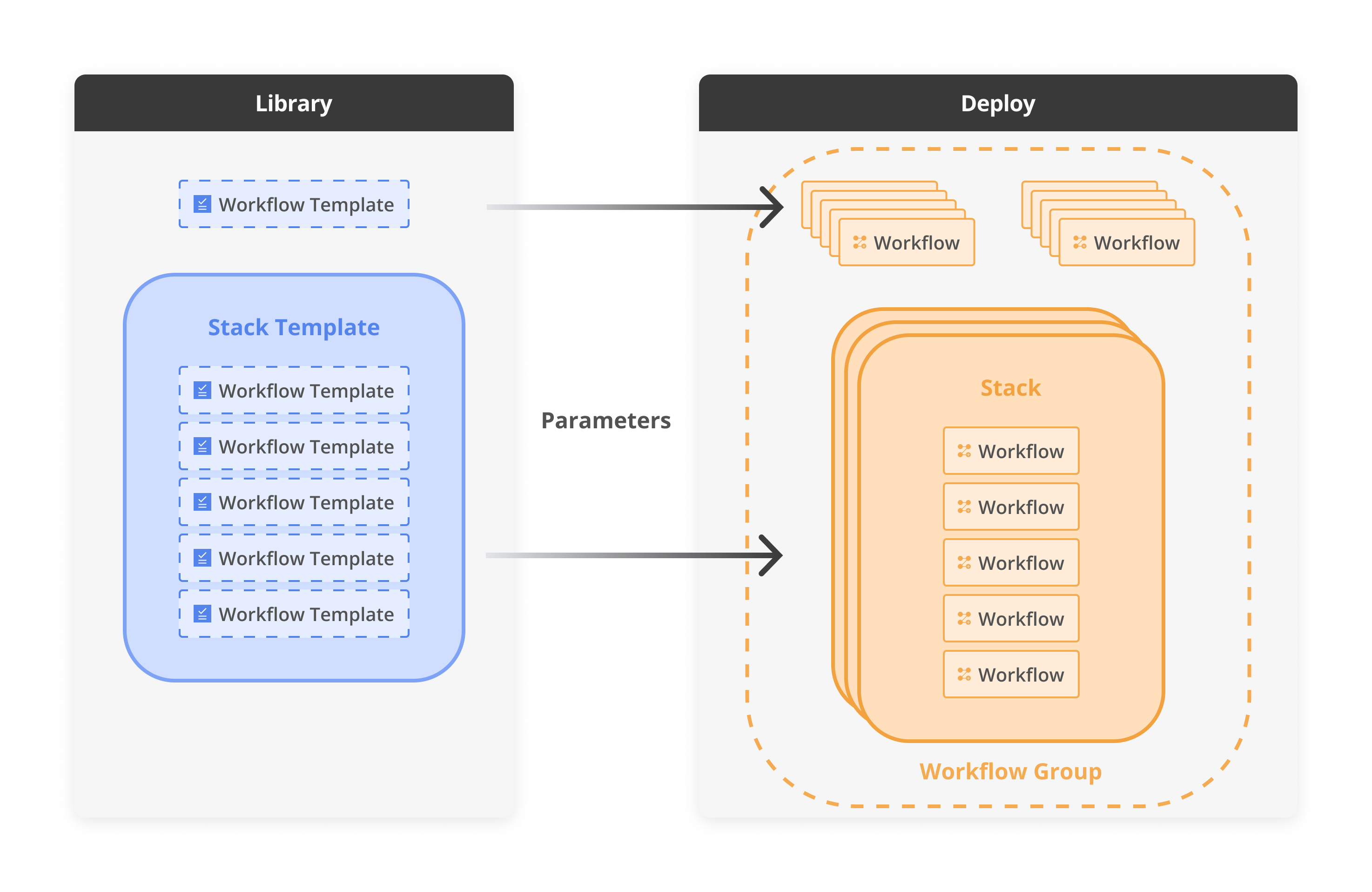
IaC integration diagram
Deploying an individual Workflow Template triggers a workflow within the development environment, effectively managing specific tasks or resources. In contrast, deploying a Stack Template, which includes multiple templates, structures the deployment as a Stack. This arrangement creates a network of interconnected workflows, where the output of one workflow becomes the input for one of the following workflows.
Template revisions and sharing status
Every Template version and every Template's visibility follow their own lifecycle. This section explains both.
Revision lifecycle
A Template revision moves through three states: Draft, Published, and Deprecated.
Draft
A Draft is a work-in-progress version of a Template. It is not production-ready, is not available in the Dev Portal, and lets you prepare and iterate on infrastructure definitions before publishing.
With a Draft, you can:
- Publish it as a new revision when it's ready for deployment.
- Create a new revision from it to formalize changes and deploy infrastructure.
- Clone it to a new Template to reuse its configuration separately.
- Delete it when you no longer need it.
Published
Published is a live, production-ready version of the Template. It is available in the Dev Portal and can be deployed by users.
With a Published revision, you can:
- Deprecate it when it's no longer recommended for use.
- Create a new revision based on it to introduce updates or improvements.
- Clone it to a new Template to reuse its configuration separately.
- Run it in the Dev Portal to deploy infrastructure.
Deprecated
A Deprecated revision is a previously Published version that is no longer recommended or allowed for use. It cannot be deployed, but you can still reference it for new revisions or cloning.
With a Deprecated revision, you can:
- Create a new revision based on it to introduce updates or improvements.
- Clone it to a new Template to reuse its configuration separately.
- Delete it when you no longer need it.
For step-by-step instructions, see Manage Template Revisions.
Template sharing status
A Template's sharing status controls who can see and deploy it: Private, Shared, or Public.
A Shared Template grants access to specific organizations without making it Public.
With a Shared Template, you can:
- Let selected organizations view and deploy the Template, without editing it.
- Keep the Template hidden from users outside the shared scope.
- Maintain full control over who has access.
- Stop sharing at any time to revoke access.